






Ambilight alternatief: Best TV Lighting Options Compared
Ambilight alternatief! Philips popularized Ambilight over a decade ago, and it’s easy to see why the feature caught on. By projecting colored light from the back of the TV that matches...

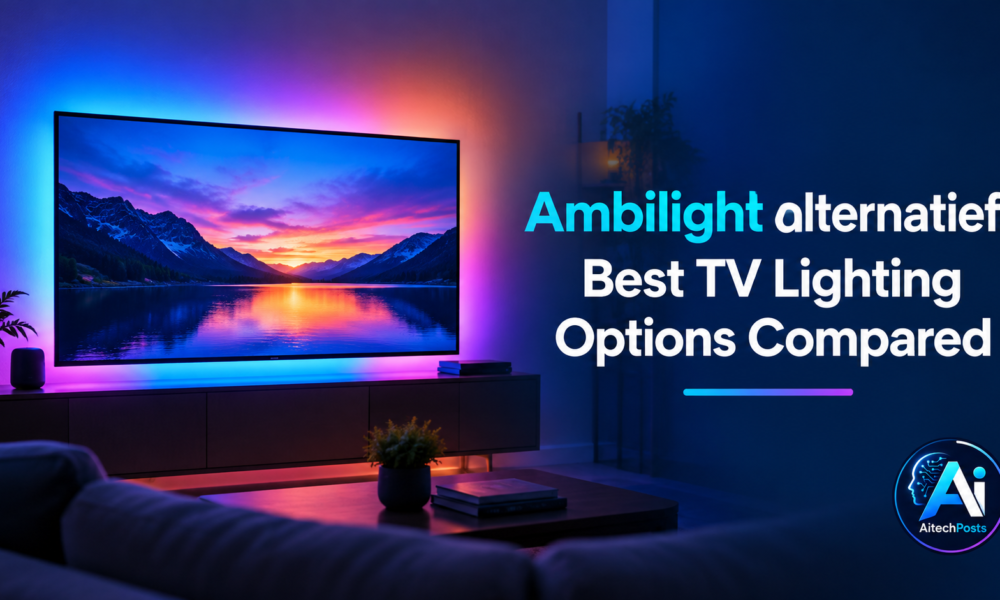
Ambilight alternatief! Philips popularized Ambilight over a decade ago, and it’s easy to see why the feature caught on. By projecting colored light from the back of the TV that matches what’s happening on screen, Ambilight makes movies feel bigger, games feel more immersive, and everyday viewing a little more atmospheric. The soft glow reduces eye strain in dark rooms and blurs the line between your screen and the wall behind it.
Table Of Content
The catch? Ambilight is a Philips-exclusive feature. If you own a Samsung, LG, Sony, or any other brand, you’re out of luck unless you look for an Ambilight alternatief.
Fortunately, you don’t need a Philips TV to enjoy this kind of dynamic backlighting. A growing range of third-party products can replicate—and in some cases improve on—the Ambilight effect, regardless of what TV you own. From simple LED strips to smart camera-based systems, there’s an option for nearly every budget and setup.
This guide breaks down the best Ambilight alternatives available today, how they work, and what to consider before buying one.
What Is an Ambilight Alternatief?
An Ambilight alternatief is any third-party lighting system designed to mimic Philips’ signature ambient backlighting effect on TVs that don’t come with it built in. These systems typically use LED lights placed around or behind the TV, paired with software or hardware that syncs the lights to on-screen colors and movement.
How External TV Lighting Systems Work
Most alternatives rely on one of two methods to detect on-screen color:
- Camera-based detection: A small camera (often clipped to the top of the TV) captures the screen in real time and relays color data to the connected lights.
- HDMI-based detection: A sync box sits between your source device (streaming box, game console, etc.) and the TV, reading the video signal directly and adjusting the lights accordingly.
Built-In Ambilight vs. External Lighting
Philips’ built-in Ambilight has a distinct advantage: it reads the video signal internally, so there’s no lag and no extra hardware to install. External alternatives, on the other hand, need added equipment, but they make up for it with flexibility. You can use them on any TV, any brand, and often expand them to light up more than just the TV.
Key Factors to Consider
Before choosing an alternative, think about:
- The size of your TV and room setup
- Whether you prioritize gaming performance or movie-watching ambiance
- How important smart-home integration is to you
- Your budget and appetite for DIY installation
Best Ambilight Alternatief Options
LED TV Backlight Strips
LED backlight strips are the most straightforward and budget-friendly option. They attach to the back of your TV using adhesive backing and plug into a USB port or power outlet.
Static vs. dynamic lighting: Basic strips offer a single, unchanging color—fine for general ambiance but not reactive to content. More advanced strips include a small sensor or software integration that adjusts color based on what’s on screen, mimicking the classic Ambilight effect.
Advantages: Affordable, easy to install, and widely available.
Limitations: Cheaper models lack true color-sync accuracy, and results can look more like generic mood lighting than an authentic Ambilight experience.
Camera-Based TV Backlighting
Camera-based systems, like Govee’s Immersion series, use a small camera mounted on top of the TV to capture the screen in real time. The captured footage is processed by a companion app, which then sends matching color data to LED strips.
How the lights react: These systems respond well to movies and games with strong color changes, like explosions or scene transitions, creating a convincing wraparound effect.
Setup requirements: You’ll need to mount the camera, connect it to Wi-Fi, and calibrate it through an app. Performance can vary depending on room lighting and camera placement, so it takes a bit more effort to get right compared to plug-and-play strips.
HDMI Sync Box Lighting
For the most accurate and responsive color-matching, an HDMI sync box is hard to beat. These devices sit between your HDMI source (a streaming device, game console, or set-top box) and the TV, analyzing the video signal directly rather than reading it optically through a camera.
Compatibility: HDMI sync boxes generally support popular streaming devices, gaming consoles, and cable boxes, making them a strong option for a fully connected entertainment setup.
Benefits: Because they read the digital signal instead of relying on a camera, HDMI sync boxes offer near-instant, highly accurate color synchronization—ideal for gaming and fast-moving content.
Smart RGB and RGBIC Light Bars
Smart light bars, such as those from Govee or Nanoleaf, aren’t strictly Ambilight clones, but they can create a similar ambient effect around the TV or room.
How they work: RGB (red, green, blue) light bars display a single color across the entire strip, while RGBIC (RGB Independent Control) bars can display multiple colors simultaneously along the same strip, allowing for more dynamic, layered lighting effects.
Smart-home integration: Most of these products connect to apps like Govee Home or platforms like Google Home and Amazon Alexa, letting you control brightness, color, and scenes with voice commands or automation.
Best use cases: Light bars work well for larger rooms or home theater setups where the goal is broader ambiance rather than pixel-accurate color matching.
Ambilight Alternatief Comparison
| Feature | LED Strips | Camera-Based | HDMI Sync Box | Smart Light Bars |
| Color sync accuracy | Low–Medium | Medium–High | High | Low (ambiance only) |
| Installation | Easy | Moderate | Moderate | Easy |
| Compatibility | Universal | Universal | Depends on HDMI ports | Universal |
| Gaming performance | Limited | Good | Excellent | Limited |
| Smart-home features | Varies | Often included | Sometimes included | Usually included |
| Price | $ | |||
| Ease of use | Very easy | Moderate | Moderate | Easy |
No single option is objectively “best.” Someone who games competitively will value the low latency of an HDMI sync box, while someone who just wants a cozy movie-night glow might be perfectly happy with a basic LED strip.
What to Look for in an Ambilight Alternative
When comparing products, keep these factors in mind:
- TV size compatibility: Strip lengths and camera angles need to match your screen size for the effect to look right.
- Screen-color synchronization method: Decide whether camera-based or HDMI-based detection fits your setup and devices better.
- RGB vs. RGBIC lighting: RGBIC offers more nuanced, multi-color effects, while RGB is simpler and often cheaper.
- Brightness and color accuracy: Look for products with a wide color gamut and adjustable brightness to avoid washed-out or inaccurate tones.
- HDMI compatibility: Check how many HDMI ports the sync box supports and whether it handles the resolution and refresh rate of your devices (like 4K or 120Hz gaming).
- App and voice-control support: Integration with Alexa, Google Home, or a dedicated app adds convenience.
- Installation and cable management: Consider how visible wires will be and whether the product includes clips or channels for tidy cable routing.
- Power requirements: Some systems need a separate power source, which may limit placement options near your TV.
Ambilight Alternatives for Gaming
Reactive lighting adds a noticeable layer of immersion to gaming, especially in fast-paced or atmospheric titles. Explosions, changing environments, and dynamic lighting effects in-game can be mirrored in your room in real time.
Low latency matters: Unlike movies, games demand near-instant syncing. Any noticeable lag between on-screen action and the lighting response can be distracting rather than immersive.
Console and PC compatibility: Many HDMI sync boxes support PS5, Xbox Series X|S, and PC setups, provided they meet the necessary HDMI and resolution requirements.
Why HDMI-based systems shine for gaming: Because they read the digital video signal directly, HDMI sync boxes generally outperform camera-based systems in responsiveness, making them the preferred choice for serious gamers.
Ambilight Alternatives for Movies and Streaming
For movie nights, the goal shifts from split-second responsiveness to overall atmosphere and immersion.
How reactive lighting changes the experience: Subtle shifts in color during dramatic scenes, sunsets, or nighttime shots can pull viewers deeper into a film, especially in a darkened room.
Compatibility with streaming services: Since streaming often runs through apps built into the TV or a connected streaming device, both camera-based and HDMI-based systems can work well, depending on your setup.
Camera-based vs. HDMI-based synchronization: Camera systems tend to feel slightly more “cinematic” since they capture the full picture, including any external light bleeding onto the screen, while HDMI systems offer cleaner and more precise color transitions.
For home theaters: A combination of ambient light bars along the walls and either a camera or HDMI-based system behind the TV can create a fuller, more layered viewing environment.
Installation and Setup Tips
- Measure your TV before purchasing an LED strip or light bar to make sure it fits your screen size properly.
- Position LED strips evenly around the back of the TV, keeping them a consistent distance from the edges for uniform lighting.
- Calibrate camera-based systems by adjusting the camera angle and running the app’s calibration tool to ensure accurate color detection.
- Connect and configure smart lighting through the manufacturer’s app, setting up any smart-home integrations you plan to use.
- Hide cables using adhesive clips or cable channels for a cleaner, more polished look behind the TV stand or wall mount.
No Comment! Be the first one.